

Quick answer: You can rename a business without wrecking your search traffic if you keep your old URLs working, redirect them permanently, tell Google about any domain change, and update your name everywhere customers and search engines see it. Expect some movement for a few weeks. Rankings don’t usually fall because you changed a name. They fall when old pages stop working, redirects are wrong, or too much changes at once. This guide walks through the plan in order.
Do you really need to rename?

A rename is expensive. People who knew your old name have to learn the new one, and searches for your brand start again from a lower base. So be sure the name is the problem.
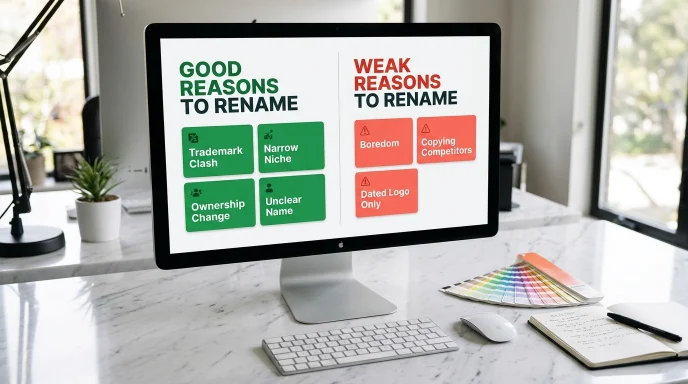
Good reasons to rename:
- A trademark or company-name clash that someone has raised with you
- A name that’s too narrow for where the business is heading
- Constant confusion with another business
- A merger, a sale or a change of ownership
- A name that’s hard to say, spell or find
Weak reasons to rename:
- You’re bored of it
- You like a competitor’s name better
- The logo looks dated (a new logo may be all you need)
If the problem is how the brand looks, change the visuals and keep the name. If the name itself is the problem, carry on.
Decide what actually changes
The risk to your rankings depends on what you change, so choose your scenario first.
- The name changes, the domain stays the same. This is the simplest and safest. Your URLs keep working, so there are no redirects to build. You update text, logos and profiles.
- The name and the domain both change. This is a site move. You need redirects and Google’s Change of Address tool.
- The name, the domain and the URL structure all change. This carries the most risk. If you can, do it in separate stages rather than in a single weekend.
The rule of thumb is to change as little as you can at one time. Many businesses can rename the brand and keep the old domain for months while the new name settles in.
The step-by-step plan
1. Check the new name properly
Run the same checks you would for a brand-new business: a web search, the domain, the social handles, the trademark register and the company register for your country. If you’re still choosing, the Business Name Generator and the Brand Name Generator can give you shortlists. For the full naming process, see our guide to how to name your business.
2. Secure the new domain and handles, and keep the old ones
Register the new domain and the matching social handles before you announce anything. Keep the old domain registered and renew it. If it lapses, someone else can register it, and the redirects stop working.
3. Build a URL map
Only needed if URLs change. List every important old URL in one column and its new equivalent in the next. Match pages one to one: an old product page should redirect to the matching new product page, and not to the homepage.
4. Set up permanent redirects
Use 301 (permanent) redirects from each old URL to its new one. A temporary redirect tells search engines the old page may come back, which isn’t what you want. Test a sample of old URLs before you launch, including your top pages and any pages with a lot of links.
5. Use Google’s Change of Address tool, if the domain changes

In Google Search Console, the Change of Address tool is for moving a site from one domain or subdomain to another. Google says not to use it for a move from http to https, or for changes to paths inside one site. Add and verify both properties first, and set up the redirects before you submit. Google recommends keeping the redirects in place for at least 180 days, and longer if you still see traffic arriving through them. Many SEOs keep them for a year or more. Google also publishes a full guide to moving a site with URL changes.
6. Update your own website
- Title tags, headings and body text
- The About page, contact page and footer
- Your logo and image alt text
- Internal links, so they point to the new URLs directly and don’t rely on the redirects
- Canonical tags and your XML sitemap
- Any structured data that includes your organisation’s name
7. Update everywhere else
Social profiles, your Google Business Profile (follow Google’s own guidelines for business names), directory listings, email signatures, invoices, packaging and printed material. Then list the sites that link to you and ask the important ones to update their links. A link that points straight to the new address is better than one that depends on a redirect.
8. Tell your customers, and keep the old name visible for a while
Announce the change by email and on social media. On your homepage and in your page titles, add a line such as “formerly Old Name” for several months. People who search for your old name should still find you and understand what happened.
9. Watch the results
In Search Console, check indexing, crawl errors and performance. Look at searches for your old name and your new name separately. Check weekly for the first month, then monthly. Fix any broken redirect straight away.
Mistakes that cost rankings
- Sending every old URL to the homepage. Search engines treat that as a lost page, and visitors get lost too.
- Using temporary redirects for a permanent move.
- Changing the name, the domain, the URL structure and the design all at once. If something goes wrong, you can’t tell which change caused it.
- Letting the old domain expire.
- Leaving a “noindex” tag or a robots block from the test site on the new site.
- Forgetting internal links. They should point to the new URLs, not through redirects.
What to expect
Some fluctuation for a few weeks is normal. How long it lasts depends on the size of the site, how many links it has and how cleanly the move is done. Nobody can promise a specific recovery time. Track your numbers, fix problems as they appear, and judge the move over months, not days.
Rename FAQs
Will I lose my rankings if I change my business name?
Not necessarily. If the domain and URLs stay the same, rankings are usually unaffected, though searches for your brand name will change. If the domain moves, correct 301 redirects and Google’s Change of Address tool help search engines connect the old site to the new one. Some short-term movement is common.
How long should I keep the redirects?
Google says at least 180 days, and longer if you still see traffic arriving through them. Many SEOs keep them for a year or more, and there’s no harm in leaving them in place.
Do I need the Change of Address tool?
Only if you move from one domain or subdomain to another. Google says not to use it for a move from http to https, or for path changes within one site.
Should I change my domain when I change my name?
Not always. If the old domain still works as a web address, you can keep it for a while, or even permanently. Move it when the old name in the domain would confuse people or cause a legal problem.
This is general information, not legal or technical advice for your specific site. Test your redirects carefully, and ask a professional if the site is large or complex.
About the author: Waseem Aijaz is a WordPress developer and SEO specialist who built the free naming tools on Name Idea Lab. Read more about Name Idea Lab.