

Quick answer: To create a signature, start by choosing a style that fits how you’ll use it, professional, artistic, or minimal, then generate a few options, pick one that’s both distinctive and easy to reproduce, and practice it a handful of times until it feels natural. The goal is a signature you can sign the same way every time, not just one that looks nice once.
Most people never actually sit down and think about their signature. It just sort of happens, usually somewhere around age fourteen, scribbled a few times until it stuck. Which is fine, until you need something more intentional, for a resume, a professional email, a certificate, or just because your current signature doesn’t feel like “you” anymore.
Here’s a practical way to actually create one on purpose.
Why It’s Worth Thinking About Your Signature at All

A signature shows up in more places than people usually realize, emails, documents, business cards, even social media bios in some cases. It’s a small, repeated piece of your personal brand.
A signature that feels intentional does a few things a rushed scribble doesn’t:
- It looks consistent. The same signature, signed the same way, builds a sense of reliability over time.
- It reflects your personality. A bold, flowing signature reads differently than a clean, minimal one, and that’s worth choosing on purpose rather than by accident.
- It’s easier to reproduce. A signature you actually like is one you’ll sign confidently, instead of rushing through it and hoping it looks the same as last time.
Step 1: Decide What You’re Actually Using It For
Before picking a style, think about where this signature will show up most. A signature for signing legal or professional documents benefits from being clean and consistent. A signature for creative branding, like a logo or a personal website, has more room to be expressive.
This single decision narrows your options a lot faster than browsing everything at once.
Step 2: Generate a Batch of Options, Don’t Try to Invent One From Scratch
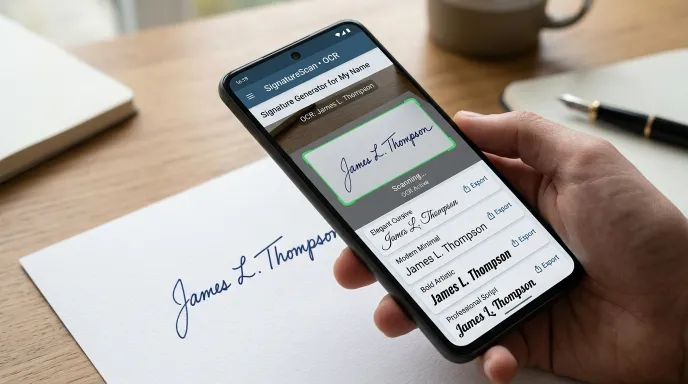
Trying to design a signature completely from memory rarely works well. It’s much easier to look at a wide range of real options and react to them.
This is where a dedicated signature generator is genuinely useful. Instead of hand-drawing a dozen attempts and comparing them, you can generate a large batch across different style categories in seconds and immediately see what actually appeals to you.
A few things worth trying while you browse:
- Compare a minimalist style against a calligraphy-heavy one to see which direction feels right.
- Adjust the complexity level, simpler styles are easier to reproduce consistently; more elaborate ones look more distinctive but take more practice.
- If part of your identity ties to a specific language or region, look into regional or translated style options as well.
Step 3: Narrow It Down With a Simple Test
Once you’ve got a shortlist, run each option through this quick check:
- Can I read my own name in it? A signature that’s completely illegible can feel less personal, and in some contexts, less professional.
- Could I sign this quickly and have it still look roughly the same? If a design only looks good when carefully traced, it’s not going to hold up in daily use.
- Does it fit the context I picked in Step 1? A wildly artistic flourish might be perfect for a creative portfolio and completely wrong for a formal document.
Whatever passes all three is a strong candidate.
Step 4: Practice It Until It’s Automatic
This step gets skipped constantly, and it’s the difference between a signature you sign confidently and one you’re still hesitating over six months later.
- Trace or copy your chosen design by hand ten to fifteen times.
- Try signing it quickly, without overthinking each stroke, the goal is muscle memory, not careful reproduction.
- Compare a few attempts side by side. Small natural variation is normal; if it looks completely different each time, simplify the design slightly.
If you’d rather build this muscle memory digitally first, a canvas-based draw pad (many signature tools include one) lets you practice the same way you would on paper, which is a solid middle step before committing to it in real documents.
Signature Styles by Use Case
| Use Case | Best Style Direction | Why It Works |
|---|---|---|
| Professional documents & email | Clean, minimal, or executive script | Easy to read, consistent, reproduces reliably |
| Creative portfolio or personal brand | Artistic, flowing calligraphy | Reflects personality, stands out visually |
| Legal or formal paperwork | Simple, consistent, moderate complexity | Prioritizes reliability over flourish |
| Social media or informal use | Playful, short, or monogram-style | Quick to sign, casual tone |
Mistakes Worth Avoiding
- Choosing a style you can’t reproduce quickly. A beautiful but overly complex design becomes a liability if you need to sign something in a hurry.
- Copying someone else’s signature style exactly. Borrowing inspiration is fine, but a signature works best when it’s shaped around your actual name and handwriting tendencies.
- Never practicing before “committing” to it. Using a brand-new, unpracticed signature on an important document is how inconsistent signatures happen.
- Ignoring legibility completely. A signature doesn’t need to be readable letter by letter, but if it’s unrecognizable as your name at all, it can raise questions in formal settings.
Digital vs. Handwritten: Do You Need Both?
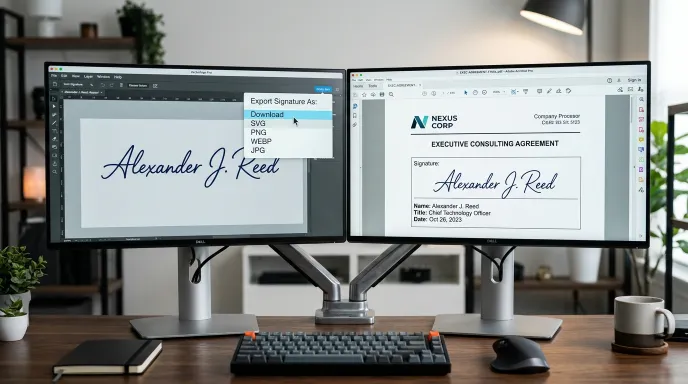
Most people today end up needing two versions of the same signature, a digital image for emails, documents, and online forms, and a physical version they can sign with a pen. The good news is you don’t need to design these separately.
Start by generating or drawing your signature digitally, since it’s faster to compare multiple options this way. Once you’ve settled on a design, practice reproducing it by hand a few times. If the digital version is too intricate to copy accurately on paper, it’s a sign to simplify it slightly rather than force the match. The goal is one consistent signature that works reasonably well in both formats, not two completely different ones.
If you’re starting from an existing handwritten signature instead and just want a clean digital version of it, uploading a photo and letting a tool extract and style it tends to be faster and more accurate than trying to recreate it manually from memory.
How Long Should It Take to Land on a Signature?
Realistically, most people can go from “no clear signature” to a finalized one in under thirty minutes using this process: a few minutes deciding on use case, five to ten minutes browsing generated options, and another ten to fifteen minutes practicing the one you pick. If you’re spending days deliberating, it usually means you’re overthinking the design stage rather than genuinely comparing meaningful options. Generating a wider batch upfront, rather than trying to tweak one design repeatedly, tends to get you to a decision faster.
Common Questions, Answered
What are some good ideas for a signature? Good signature ideas usually fall into a few categories: clean minimal scripts, flowing calligraphy, initial-based monograms, or a hybrid that blends your first initial with your full last name. Browsing a range of generated examples is the fastest way to see what fits your taste.
How do I make my own unique signature? Start with your actual name rather than an abstract design, choose a style direction that matches how you’ll use it, and adjust details like slant, spacing, or flourish until it feels distinct. Practicing it by hand a few times also naturally makes it more “yours.”
What is the most beautiful signature? There’s no single “most beautiful” signature, it depends on personal taste and context. Flowing calligraphy styles are often seen as elegant, while clean minimal scripts are seen as modern and professional. The best one is whichever fits your personality and how you’ll use it.
How can I write my name as a signature? You can either write your full name, your first name only, your initials, or a stylized version that blends letters together. Many people use a mix, a stylized first initial followed by a simpler flow for the rest of the name.
Is it okay to change your signature over time? Yes. Signatures naturally evolve over the years as handwriting changes. There’s no rule requiring your signature to stay identical forever, just try to keep it reasonably consistent within any given period, especially for documents signed close together.
Should my signature match my legal name exactly? Not necessarily letter for letter, but it should be clearly connected to your legal name. A stylized version or initials-based signature is generally fine as long as it’s consistently used and recognizable as yours.
Wrapping Up
A good signature isn’t something you stumble into, it’s something you can build on purpose in about twenty minutes: pick a direction, generate a batch of real options, test a shortlist, and practice until it’s automatic. If you want to skip straight to the browsing step, the free signature generator gives you dozens of styles to compare instantly, type your name, draw it yourself, or upload a reference and go from there.
For more free naming and branding tools, including options for your business name, logo, and brand identity, check out the full Business Naming & Branding Tools collection, or generate your next batch of ideas directly on the signature generator page.
Written by Waseem Aijaz, WordPress Developer and SEO Specialist. Connect on LinkedIn.